Battery health
Real full-charge capacity versus the original design — as a percentage, not a guess. Watch the wear happen.
Menu-bar utility · macOS
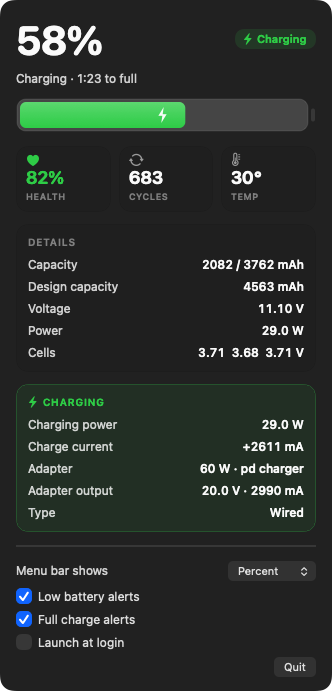
Health, cycle count, temperature, per-cell voltage, and live charging power — the full picture macOS hides, one click away in your menu bar.
Free · Native Swift · Apple Silicon & Intel · macOS 13+
What it shows
Real full-charge capacity versus the original design — as a percentage, not a guess. Watch the wear happen.
The number macOS buries three menus deep in System Information, kept in plain sight.
Live cell temperature, color-coded so you notice heat before it becomes a problem.
Exactly how many watts are flowing in, the charge current, and your adapter’s real output.
Every cell’s voltage, side by side, so an unbalanced pack has nowhere to hide.
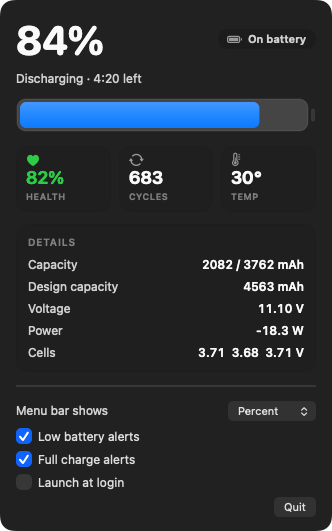
A rolling 30-minute chart of what your Mac is really consuming — one honest line on battery or plugged in — plus time-to-full and time-to-empty.
Light or dark
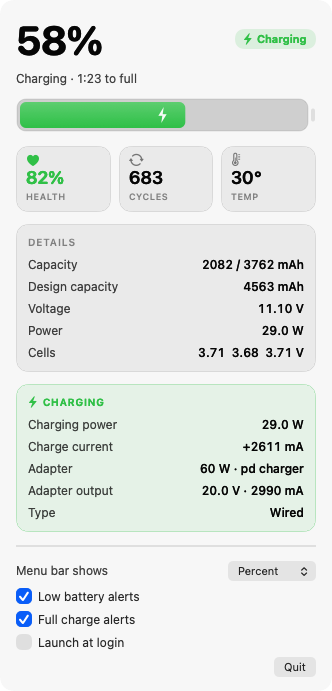
The panel adapts to your system appearance, with a battery gauge that fills to your real charge and turns green the moment you plug in. The layout never moves — plug in or unplug and nothing jumps around under your pointer.
Under the hood
No Electron, no web view, no background CPU hog — just AppKit reading Apple’s own IOKit battery data and refreshing every few seconds.
FAQ
Yes. BatteryInfo is completely free to download and use, on both personal and work Macs. There are no accounts, trials, or in-app purchases.
Battery health (real capacity versus the original design), charge cycle count, live temperature, per-cell voltage, real-time charging power and adapter details, and a rolling 30-minute chart of how many watts your Mac is actually drawing — information macOS buries in System Information or doesn’t surface at all.
Yes. BatteryInfo is a native app that runs on both Apple Silicon and Intel Macs and requires macOS 13 (Ventura) or later.
That is Gatekeeper blocking an unsigned download. The easiest fix is the terminal installer, which uses curl so macOS never quarantines the app: run “curl -fsSL https://dl.batteryinfo.app/install.sh | bash”. If you downloaded the .dmg instead, clear the quarantine flag with “xattr -dr com.apple.quarantine ~/Downloads/BatteryInfo.dmg”.
No. The app runs entirely on your Mac, reads battery data locally, and never connects to the internet — no telemetry, tracking, or accounts.
Free and native. One line installs it and opens it — no Gatekeeper prompt.
curl -fsSL https://dl.batteryinfo.app/install.sh | bash Installs BatteryInfo to Applications and launches it. Nothing to sign in to.
or
↓ Download the .dmg
Requires macOS 13+. The app is unsigned, so if macOS blocks the .dmg,
clear the download flag once:
xattr -dr com.apple.quarantine ~/Downloads/BatteryInfo.dmg